Spleven, a Splitwise alternative
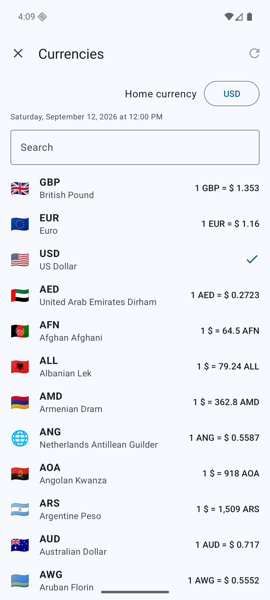
Splitwise is the best-known split app, but its free plan allows only 4 expenses a day and keeps each currency apart. Spleven has no daily limit, no ads and converts every currency for free.
No daily limit, no ads
Splitwise's help centre says free users can add up to 4 expenses a day; Splitwise Pro removes the limit and promises no ads. Spleven is free with no limit on payments or groups and shows no ads.
Every currency converted, for free
The free Splitwise plan keeps a balance per currency; Pro converts the whole group at the rate of the moment you press convert. Spleven converts every payment to each person's own home currency at the rate of the payment's day and keeps that rate, so totals don't move later.
No account needed
Splitwise needs an account. In Spleven you can create a group and share it with one link without signing up, and friends join in the Android or iPhone app or in a browser at web.spleven.com.
Categories, payment methods, statistics
Splitwise uses a fixed list of categories and keeps charts for Pro. Spleven lets you make your own categories, adds payment methods such as card, cash or a kitty, and shows statistics per day, category, currency, person and payment method for free. It exports a group as CSV or PDF.
Places and the group map
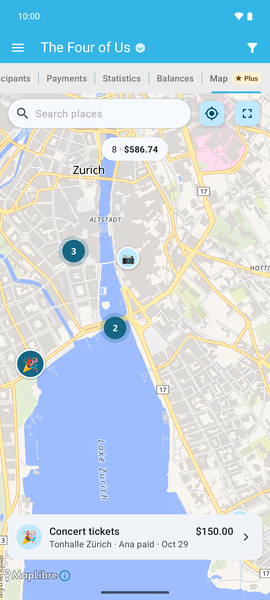
Every payment keeps the place it was paid, and with Spleven Plus the group map shows them all. Splitwise has nothing like it.
Scan a receipt, split it by item ★ With Spleven Plus
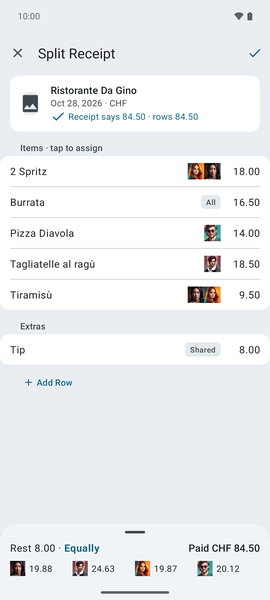
Both apps scan a receipt and split it by item: Splitwise with Pro, Spleven with Spleven Plus. Photograph a bill, tap who had what, and the tip is shared out for you.
Where Splitwise leads
Splitwise has far more users, with over 10 million downloads on Google Play. It has activity history, restoring deleted expenses, reminders to people who owe, and splits by percentage. It can pay people inside the app in the US and in some European countries, keeps balances outside a group, and has an iPad app. Spleven has none of these.
Spleven is made by an independent developer in Switzerland and paid for by Spleven Plus, an optional purchase for receipt scanning and the group map.
Moving over
Spleven cannot import from Splitwise. The simplest way is to start your next trip or month in Spleven. To carry over what is still owed, enter each transfer Splitwise suggests to settle up as one payment in Spleven, paid by the person who is owed, for the person who owes.
Sources
The facts about Splitwise come from its own website, help centre and store listings, checked on November 4, 2026. The comparison of five split apps lists every source. We make Spleven; if something here is wrong, tell us.